

The Herobahisbet app question comes up often, so this page gives a technical answer. The platform's main focus is sports betting with fast access, followed by casino and live casino, and on a phone all of it runs through a responsive mobile site in the browser. There is no official app in the App Store or Google Play, and an official APK file has not been announced. What follows explains how to open the site quickly, how to add a home-screen shortcut on Android and iOS, which features work on a small screen and how to keep the account safe. This is an information page; it accepts no bets or payments itself.
Everything described here is intended for adults aged 18 and over. Mobile play makes sessions easy to start and easy to stretch, so a spending limit and a time limit should be set before logging in, and losses should never be chased with larger stakes.
Herobahisbet Mobile App Guide
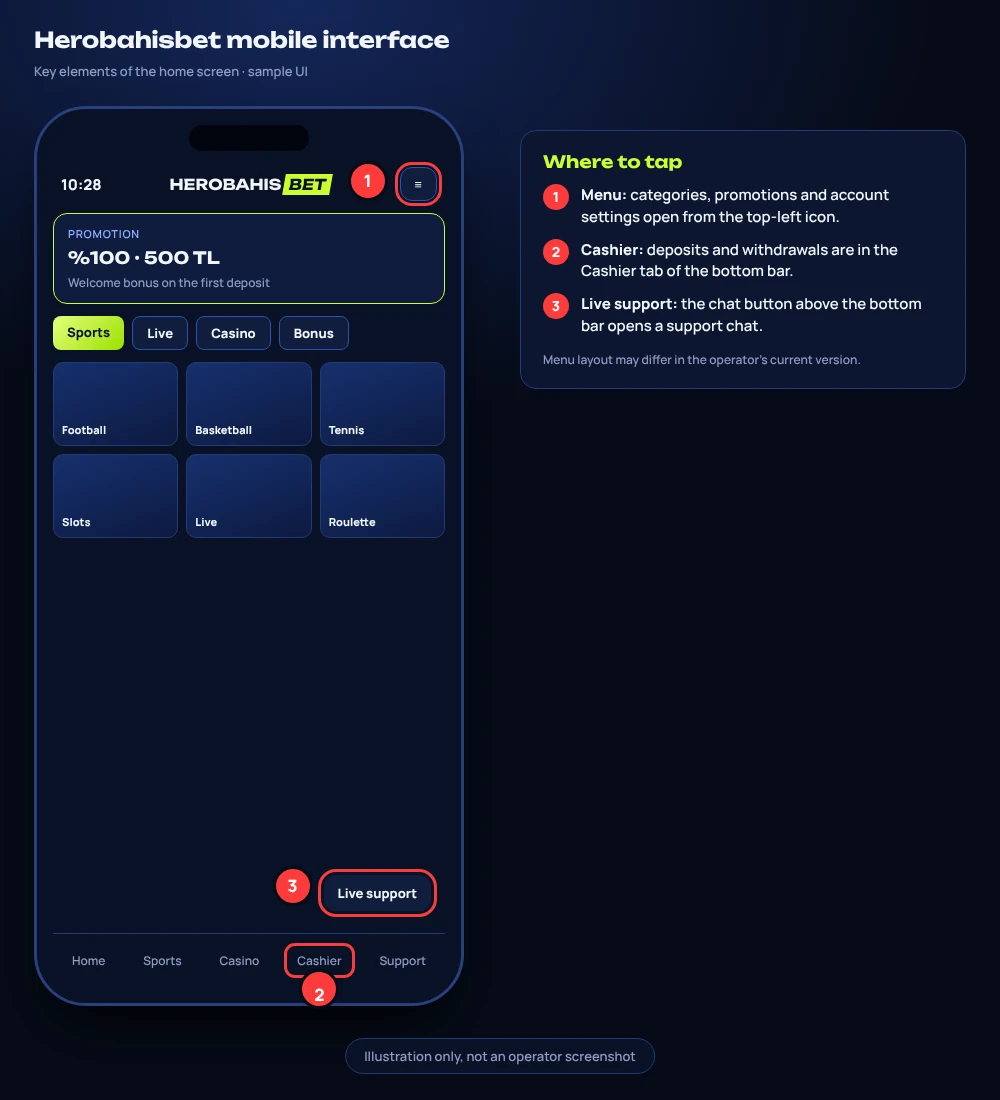
When people search for the Herobahisbet app, what they normally need is a dependable way to reach the sports lobby and the casino from a phone. The practical answer is the mobile web version: it adapts its layout to the screen width, keeps the same account and menus as the desktop site, and needs no installation. Updates happen on the server side, so the version opened in the browser is always the current one.
Quick Start on Any Phone
- Open the phone's default browser (Chrome on most Android devices, Safari on iPhone).
- Type the official address manually or open it from a bookmark saved earlier; avoid links received through messages or unknown pages.
- Check that the address bar shows a padlock and the connection uses HTTPS.
- Tap the login button and enter the username and password.
- Choose Sports or Casino from the main menu and allow the page to finish loading.
- Optionally add a home-screen shortcut, as explained in the Android and iOS sections below.
What the Shortcut Actually Is
A home-screen shortcut looks like an app icon, but it simply opens the mobile site in a browser window, often without the address bar. Nothing is downloaded beyond the browser's normal cache, and no extra permissions are requested. For this reason the shortcut is the closest thing to a Herobahisbet app that can be set up safely today.
Browser vs Native App
A native app is software installed from a store or an installation file; a browser version is a website shaped for small screens. The table compares the two from a user's point of view.
| Aspect | Mobile browser version | Native app (store or APK) |
|---|---|---|
| Availability | Available on Android and iOS | No official store listing; official APK not announced |
| Installation | None; optional home-screen shortcut | File download and system permissions |
| Updates | Automatic on every page load | Manual or store-driven |
| Storage used | Browser cache only | Separate installation space |
| Main risk | Phishing pages imitating the site | Modified files from third-party sources |
| Account | Same login as desktop | Same login, if an official build ever appears |
In practice the browser-based Herobahisbet app route removes the riskiest step, which is installing a file of unknown origin. It also means a phone that is several years old can still open the site, provided the browser itself is kept up to date.
Performance Tips
The mobile site loads faster when the browser is updated, unused tabs are closed and the phone has some free storage. Live streams and live casino tables use more data than the sports list, so a stable Wi-Fi connection is preferable for long sessions. If pages stop responding, clearing the browser cache for the site usually solves display problems.
Herobahisbet Android Installation
Many Android users look for an APK first. At the moment an official APK has not been announced, and files offered on forums, file-sharing sites or social media posts should not be installed. Such files can be altered to capture passwords or payment details, and installing them requires allowing apps from unknown sources, which weakens the phone's protection.
Safe Home-Screen Shortcut in Chrome
- Open Chrome and go to the official address.
- Confirm the padlock in the address bar.
- Tap the three-dot menu in the top right corner.
- Select "Add to Home screen" (on some versions "Install app" is shown for websites).
- Edit the name if needed and confirm with "Add".
- Open the new icon from the home screen and log in.
If an Official File Is Published Later
Should the operator ever publish an installation file on its own official site, general safe practice applies: download it only from that page, never from a mirror or a message link; allow installation from unknown sources only for the duration of the install and switch it off afterwards; check that the requested permissions match a betting app; and remove the file from the Downloads folder after installation. Until such a file appears, the Herobahisbet app experience on Android is the browser shortcut described above.
iOS Setup
iPhone and iPad users cannot install anything from outside the App Store, and there is no official App Store listing. Safari, however, offers a reliable home-screen shortcut that behaves much like a lightweight web app.
Adding the Shortcut in Safari
- Open Safari and enter the official address.
- Wait until the home page has fully loaded and the padlock is visible.
- Tap the Share icon (the square with an upward arrow).
- Scroll down and select "Add to Home Screen".
- Keep or change the suggested name, then tap "Add".
- Launch the icon from the home screen and sign in.
Useful iOS Settings
If the site opens without the address bar, it can be hard to confirm the address later; opening it once in normal Safari is a quick way to check. Safari's built-in password manager can store the login, but a passcode or Face ID on the device itself should protect it. Content blockers occasionally interfere with live streams, so a blocker may need to be paused for the site if video does not start.
Herobahisbet Mobile Betting Features
The sports section works the same way on a phone as on a computer, with the layout compressed into sliders and drop-down lists. More than 20 sports are covered, including football, basketball, tennis, volleyball, MMA, e-sports and cricket. Events appear as pre-match fixtures, live matches and virtual sports, and bets can be placed as singles, combos, system bets and live bets.
Reading Odds on a Small Screen
Odds are shown in decimal format. Multiplying the stake by the odds gives the possible total return, stake included. For example, 100 TL at 1.85 returns 185 TL if the selection wins; 50 TL on a selection at 2.40 returns 120 TL. In a combo the odds of each selection are multiplied, so two selections at 1.50 and 1.70 give total odds of 2.55.
| Bet type | Selections | Settles as a win when |
|---|---|---|
| Single | One | That selection wins |
| Combo | Two or more | Every selection wins |
| System | Several, grouped into combinations | Enough combinations win |
| Live | One or more, during the match | The selection wins at the accepted odds |
Live Betting on Mobile
During a live match the odds can change between the tap on a selection and the confirmation of the slip. When that happens, the slip shows the updated value and asks for confirmation again. A slow connection makes this more frequent, which is one more reason to use stable Wi-Fi for live betting. Whether a cash-out option exists for a particular slip is shown on the bet slip screen. The phone layout keeps the bet slip as a floating panel, so selections can be reviewed without leaving the match page.
Casino UX
Inside the Herobahisbet app shortcut, the casino side lists more than 1,000 games, grouped into slots, live casino, live tombala, virtual sports and crash games. On a phone the categories appear as a horizontal tab row, and a provider filter narrows the list to studios such as Pragmatic Play, NetEnt, Play'n GO and Microgaming.
Slots and Crash Games
Most slots open in portrait or landscape mode and adapt to the screen. Some games offer a demo mode for learning the rules without a real balance, and some include a bonus-buy option, which costs a multiple of the base stake in one go. Aviator by Spribe, a crash game, suits a phone well because the interface is a single screen: the multiplier rises, and the player taps to cash out before it stops. Because rounds last only seconds, a fixed stake per round helps keep the pace under control.
Live Tables
Live casino tables come mainly from Evolution and Ezugi, with titles such as Lightning Roulette and Crazy Time, while brand banners also show Pragmatic Play's Mega Roulette and imaginelive's Speed Roulette. Streams adjust to the connection, and lowering the video quality reduces mobile data usage. Table limits are displayed on the table card before joining, and the rules for a dropped connection are written in each game's help section.
Herobahisbet Data Security
Using a browser instead of an unofficial file already removes one major risk, but account safety still depends on a few habits. The site should always open over HTTPS with a padlock in the address bar, and the address should be typed or opened from a personal bookmark rather than from a link in a message.
Account Protection Checklist
- Use a unique password that is not repeated on other sites.
- Lock the phone with a passcode, fingerprint or face recognition.
- Check the security section of the account settings for additional login protection options.
- Log out after sessions on shared or public devices.
- Avoid logging in on open public Wi-Fi networks where possible.
- Keep the operating system and browser updated.
Support and Verification
Support never asks for a password or one-time codes; any message requesting them should be treated as an attempt at fraud. Live support hours are periodically reported as 10:00–02:00, at times 24/7, and e-mail replies arrive within 12–24 hours. At the withdrawal stage an ID document, proof of address or a payment-method document may be requested, and withdrawals are made only to an account in the member's own name. Documents should be uploaded only through the official account area, never sent through social media. These rules apply to the Herobahisbet mobile site in exactly the same way as on desktop.
Anyone who feels that betting is becoming hard to control can find support and practical information at GambleAware (gambleaware.org).
FAQ
Does the mobile site need a separate account?
No. The same username and password work on desktop and on the mobile browser version, and the account settings are shared between them.
Why does the home-screen icon open without an address bar?
Browsers can open shortcuts in a full-screen window. The page is still the website itself; to check the address, open the site once in a normal browser tab.
Can the shortcut send push notifications?
Notification behaviour depends on the browser and the phone's settings. If the site asks for permission, the request can be accepted or declined in the browser's site settings at any time.
Is it safe to install an APK shared in a Telegram group?
No. An official APK has not been announced, and files from chats, forums or file-sharing sites can be modified. The browser version or a home-screen shortcut is the safer route.
Does mobile data usage rise during live casino?
Yes. Video streams use considerably more data than the sports list or slots. Lowering the stream quality or switching to Wi-Fi reduces consumption.
Can a bet slip started on a phone be finished on a computer?
Selections are tied to the device session, so a slip may not carry over between devices. Placed bets, however, appear in the bet history on any device after logging in to the Herobahisbet app shortcut or the desktop site.